Short Maker
One long video in, a batch of vertical Shorts out — with a headline in your language.
What Short Maker does
Short Maker is the part of Bulk Scheduler that turns one long video into several 1080×1920 Shorts. It cuts clips of about 55 seconds back to back from a video in your library, draws a headline across the top of each, and writes a title, description and tags from the context of the account you choose. The headline can be written by the AI in Hindi, Tamil and eight other Indian scripts as well as English, or typed by you, and changed after the Short is made. Each clip lands in your Library as its own video, ready to schedule to YouTube, Instagram, TikTok or LinkedIn. Rendering runs on the server, so a batch keeps going after you close the page.
Headlines in Hindi, Tamil and other Indian scripts
Text drawn in a font that has no Indian scripts comes out as a row of empty boxes, or with its vowel signs in the wrong place — which is what Short Maker itself did until October 2026. It now draws each script in a font made for it and shapes the text properly, so conjuncts like क्ष and श्र form correctly and a number inside a Hindi headline looks like the words around it. Pick the language on the form and the AI writes the headline in that language's own script, not in English letters.
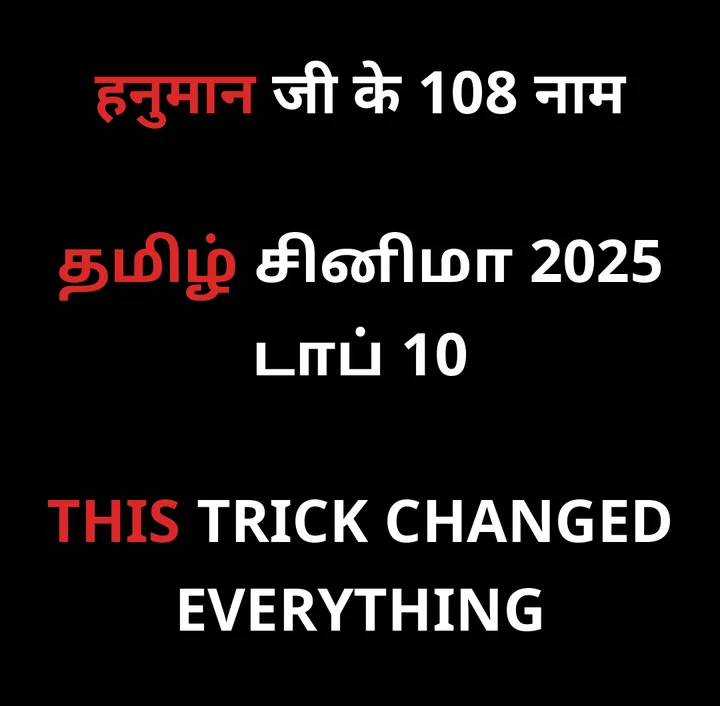
Supported scripts: Latin (English and other European languages) · Devanagari (Hindi, Marathi, Nepali) · Tamil · Bengali · Telugu · Kannada · Malayalam · Gujarati · Gurmukhi (Punjabi) · Odia.
What each clip comes with
A vertical 1080×1920 video
A landscape source is centred with black bars above and below, and the headline sits in the top bar so it never covers the picture. A portrait source fills the height of the frame.
A headline on top
Three to six words, written by the AI in the language you pick with one word picked out in red or yellow — or your own words, typed in.
Title, description and tags
Written from the context of the account you choose, so a devotional channel and a tech channel do not get the same copy.
A Library item, ready to schedule
Each clip lands in your Library as its own video. Tick Auto Upload and it joins your existing auto-upload campaign as soon as it is rendered.
Change the headline after the Short is made
The headline is part of the video, so changing it means rendering the Short again — and Short Maker does that for you. Open the Short from the job list or the Library, type the new headline, and a minute or two later the same Short has it. Nothing is charged, and the Short keeps its place: posts already scheduled with it and its Virality Score stay attached. A long headline is made smaller until it fits, rather than being cut off.
How to make Shorts from a long video
About two minutes of your time. The rendering runs without you.
Upload the long video to your Library
Drag it onto the Library screen. Short Maker only works from videos you uploaded yourself — it does not download from other people's channels.
Open Short Maker and pick the video
Clipping is the first tab. Choose the video; the form shows its length and how many ~55-second clips it holds.
Choose the headline and the context
Type a headline, or leave the box empty for the AI. Pick which account's context the AI should write from, and set the language — Hindi, Tamil and the rest are drawn in their own script.
Set the number of clips and the two switches
Auto AI writes the headline, title, description and tags and uses one AI credit per clip. Auto Upload sends finished clips into your existing auto-upload campaign.
Press Start and carry on working
The Shorts render on the server. Progress shows in the corner of every dashboard page and you are told when the job finishes; each clip appears in your Library, and its headline can still be changed.
Questions about Short Maker
What is Short Maker in Bulk Scheduler?
Short Maker turns one long video from your library into vertical 1080x1920 Shorts, each with a headline drawn across the top and an AI-written title, description and tags. It cuts clips of about 55 seconds back to back from the start of the video, so a ten-minute video holds up to ten of them, and you choose how many you want. Every clip is saved to your Library as its own video, ready for YouTube Shorts, Instagram Reels, TikTok or LinkedIn, and can be scheduled or fed straight into an auto-upload campaign. The rendering runs on the server, so it keeps going if you close the page, and progress shows on every page of the dashboard while it works.
Can the headline on a Short be in Hindi or Tamil?
Yes. Headlines render in Devanagari, Tamil, Bengali, Telugu, Kannada, Malayalam, Gujarati, Gurmukhi and Odia as well as Latin script, each in a font made for that script, with conjuncts and vowel signs shaped correctly. Numbers inside a Hindi or Tamil headline are drawn to match the words around them, and a headline that mixes English and Hindi is fine. Set the language on the Short Maker form and the AI writes the headline in that language and its own script rather than in English letters, or type the headline yourself. Emoji are left out of the headline rather than drawn as boxes.
Can I change a Short's headline after it is made?
Yes, from the Short Maker job list or the Headline button on the Short in your Library. Type the new headline and the Short is rendered again with it, which takes a minute or two and costs no credits. The Short keeps its place in your Library, so anything already scheduled with it, and its Virality Score, stay attached. Two cases cannot be changed: Shorts made before 9 October 2026, because they were rendered before the information needed to redo them was kept, and a Short made from a portrait video whose original you have since deleted, because its old headline sits on top of picture that no longer exists anywhere.
How many Shorts can I make from one long video?
Up to one for every 55 seconds of the source, because clips are cut back to back rather than overlapping. A three-minute video holds three, a ten-minute video ten. Short Maker shows the number possible as soon as you pick the video. If you ask for more than the video contains, the form says so before you start, and you get the number that fits. You are only charged for clips the video can actually produce. To get more Shorts out of one recording, upload a longer cut of it; to get fewer, simply ask for fewer and the rest of the video is left alone.
How much does Short Maker cost to use?
Each clip uses one Short render from your plan's monthly allowance. With Auto AI switched on, each clip also uses one AI credit, which pays for the headline, title, description and tags. Switch Auto AI off and no AI credit is used: the clip takes your typed headline, or the video's own title if you leave it empty, and a plain title. The whole batch is charged when it starts, and any clip that fails to render has its render and its AI credit refunded automatically, so you never pay for a Short you did not get. Changing a headline afterwards is free. Exact allowances per plan are on the pricing page.
Which account's context does the AI write from?
The one you pick. Every connected account has its own context, a short description of what that account is about, who watches it and in what tone, and the AI writes the title, description and tags from it. Short Maker lists your accounts above the context box and fills the box from the account you choose; you can edit the text for this one job without changing the saved context. Nothing at Short Maker time decides which account a clip will be posted to, which is why the choice is yours rather than guessed. An account without its own context uses the one written for its platform.
Short Maker's second tab pairs a reaction clip with your videos — seereaction videos. Every clip can be graded with the Virality Scorebefore it goes out; allowances are on the pricingpage and per-action costs under credits.
Last updated 2026-10-09